How it works
Order at the window,
the kiosk, or the seats.
Every order lands on the kitchen screen the moment it is placed, and every sale is in one report.
Three parts
Fans, the counter, and the person running it.
01
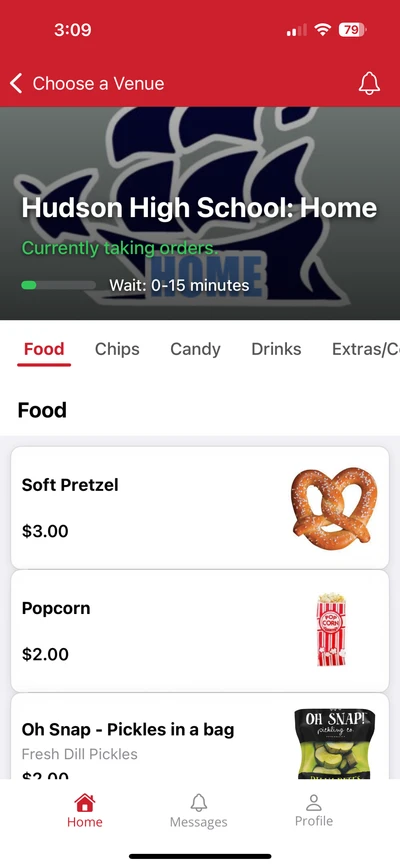
For fans in the seats
- 1.Scan the QR code on the banner or the menu board
- 2.Pick items and pay with a card, Apple Pay, or Google Pay
- 3.Get a text when the order is ready
- 4.Pick it up at the window
02
At the counter
- 1.The volunteer taps the items on the terminal
- 2.The fan pays with cash, card, or phone
- 3.The ticket prints in the kitchen
- 4.Or the fan does it all at the self-checkout kiosk
03
For the organizer
- 1.Set the menu up once; change a price and it changes everywhere
- 2.Orders reach the kitchen screen the moment they are placed
- 3.Reports are live to the second, by terminal and by stand
- 4.Export for the treasurer in one click

Behind the counter
Simple enough for a first shift
Tap the items, tap Cash or Credit, and the ticket prints in the kitchen. Cash sales keep going when the Wi-Fi drops and sync when it comes back.
See the terminalThe pieces
Use one, or all of them. Menus can differ per stand.
- Terminals
- One at every window. Each reports separately.
- Self-checkout kiosks
- Fans order and pay on a touchscreen with a card reader.
- Mobile ordering
- Fans scan a code and order from the seats. Works in the browser, or in the app.
- Digital Signage
- Your menu on any TV, kept in step with the terminal.
- Kitchen and pickup screens
- Every order from every source, in one place, as it comes in.
- Fundraising and pre-orders
- Spirit wear, dinner tickets, cookie drives, with pickup dates.
- Reports
- What sold, when the rush hit, and how much came in, by terminal.
Fans do not need to install anything; mobile ordering works in the browser. The app is also on the App Store and Google Play for fans who want saved orders.
See it on a call.
Thirty minutes. We ring a sale, print a ticket, and pull the report so you can see how it works.