High schools, band boosters, and booster clubs
Every stand on campus,run by the parents who showed up.
Football on Friday, basketball on Tuesday, the spring musical in March. BlazeBite puts a terminal at every window, a kiosk in the lobby, and mobile ordering in the bleachers. A volunteer on a first shift can ring a sale in the first minute, and the treasurer can see every sale, by stand, the moment it happens.
Start free, no setup fee Cash, card, Apple Pay, Google Pay Support from people who have worked a stand

Three ways to order
Every order lands in the same kitchen and the same report.
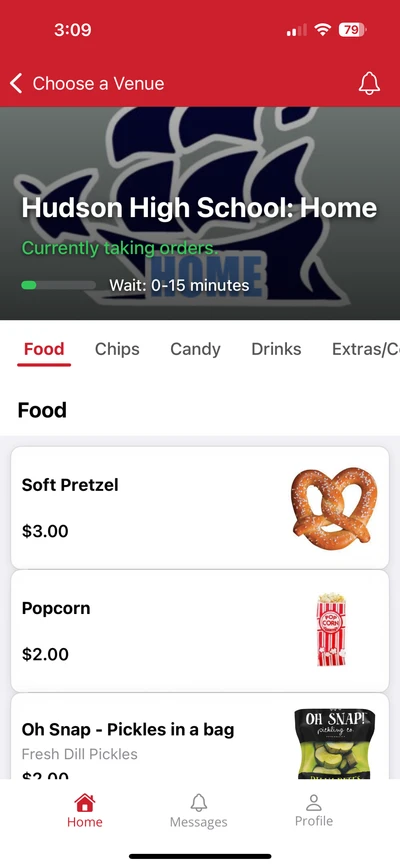
From the bleachers
- 1.A parent scans the QR code on the banner or the board
- 2.Pays with Apple Pay, Google Pay, or a card
- 3.Gets a text. Picks up at the window.
Nobody misses the third quarter
At the window
- 1.The volunteer taps the items on the terminal
- 2.Cash, card, or phone
- 3.The ticket prints in the kitchen
Set up for a first shift
At the kiosk
- 1.A fan taps through the menu on the screen
- 2.Pays on the attached reader
- 3.The ticket prints. A volunteer hands it over.
No volunteer needed at the screen
Several stands, one account
The football stand, the gym stand, and the band table each keep their own menu.
Every terminal, kiosk, and QR code belongs to a stand, and every stand has its own menu and its own report. The football stand sells walking tacos, the gym stand sells candy and pop, and the band boosters sell spirit wear at the musical, all on one school account.
A district or a diocese can put every school on one account. Each school keeps its own menus, its own terminals, and its own report.

The treasurer report
What sold, at which stand, paid how, live to the second.
The report shows every sale by terminal, by stand, and by event as it happens. Cash, card, and phone sales are listed separately, so the drawer count at the end of the night matches the report, and the treasurer can export it in one click.
- Sales by stand and by terminal
- Sales by hour, so you know when the rush hit
- Cash, card, and phone, reconciled against the drawer
- Items sold, so you know what to reorder before Friday
- Sales by terminal
- Football stand, gym stand, kiosk, phone
- Sales by event
- Friday football, Tuesday basketball, the musical
- Cash, card, and phone
- Reconciled against the drawer
- Items sold
- What to reorder before the next game
- Refunds and voids
- Who, when, and why
The report the treasurer reads. Export it in one click.
Fundraising and pre-orders
Spirit wear, spaghetti dinner tickets, and meals for the band.
The same phone menu that sells nachos at the game can sell spirit wear, dinner tickets, and cookie dough. Band members and teams can pre-order meals for a competition so the food is ready when the bus pulls in, and parents can order for the whole family from the stands.
Every order comes in with the buyer, the size, and the total, plus a report your vendor can fill from.
Student-run stores
Inside the school, and the students run it themselves.
Schools open a store in the building, sell to students during the day, and hand the whole thing to the students to run. They take the orders, ring the sales, and pull the report at the end of the week. The point is not the snacks. It is a business they lead, with real money and real numbers behind it, which is the part a classroom cannot fake.
It started with one school asking whether they could use BlazeBite for theirs, and others have set up the same way since. The register is the same one that goes out to the stand on Friday night, so a student who works the counter at lunch already knows the terminal at the game. Prices and the menu are set in the portal, so what is on the register is already right and there is nothing a first-timer can break.
- It keeps its own menu and its own report, separate from the stand
- Students see what sold, item by item, and what the week took in
- Cash, card, Apple Pay, and Google Pay, so it is not cash-only
- A teacher or an advisor pulls the report without taking over the register

Set up for a parent on a first shift.
Everything a volunteer needs to know fits on one card taped to the counter.
- Tap the items, take the payment, hand over the food
- Cash, card, Apple Pay, and Google Pay at every terminal
- The ticket prints in the kitchen on its own
- Cash sales keep going when the Wi-Fi drops, and sync when it comes back
- Support from people who have worked a stand
“We used to see so many people walk away when our stand was cash-only. Now they pay by phone and the line moves. Sales are up, and I know exactly what we took in.”
Grade school administrator
Diocese of Cleveland school, second season on BlazeBite
See it at a school near you.
A thirty-minute call to walk through the terminal, the kiosk, and mobile ordering, or we can put you in touch with a school near you that uses it.